

The Strategic Value of Automation Testing for Startups
Are you a tech leader, CEO, or CTO in a fast growing tech startup? You likely want to implement automation testing for your SaaS product to ensure rapid releases without breaking core features. Moreover, for many early stage companies, the pressure to ship fast often leads to technical debt and buggy releases. A robust strategy for automation testing lets your team maintain quality while speeding up the development cycle. Reliable quality assurance supports your scaling efforts because manual checks cannot keep up with frequent updates.
Practical test automation and QA workflows are critical because they protect the user experience during every deployment. Startups often operate with lean teams where every hour of developer time is precious. By automating repetitive tasks, you free your engineers to focus on building new features instead of fixing old bugs. These workflows focus on essential areas:
- Your login and authentication flows
- Dashboard performance and data loading
- Checkout and payment processing stability
Consistency in software performance builds trust with your users and prevents churn. BugBug offers a low code solution that simplifies these complex processes for your entire team. You can record UI flows and validate business logic without the need for extensive coding or framework setups. This approach makes QA accessible even if your startup lacks dedicated automation engineers. Start with the flows used by the majority of your users to see immediate benefits in your release cycle. This guide will walk you through setting up efficient systems to keep your product stable as you scale.
Essential Steps for Automation Testing
Start your journey by focusing on the most important parts of your application. You should prioritize flows used by 80 percent of your users because this covers the majority of their experience. Using a platform like Demo SaaS allows you to practice these scenarios without risking your production environment. Moreover, Demo SaaS mimics real world web applications so you can explore various testing situations safely. You can find more about general industry standards at BrowserStack which provides insights into various testing environments.
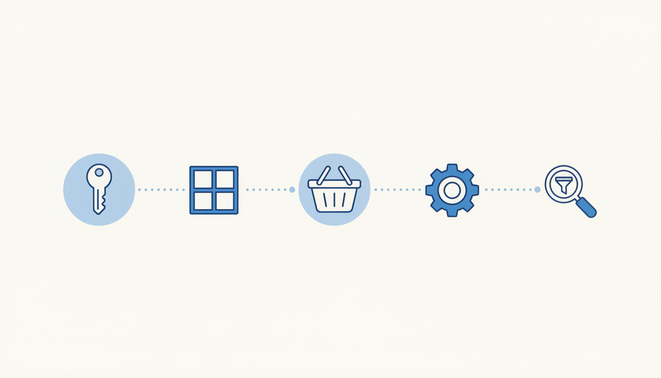
When you begin, you must select the right tests to automate first. Most successful startups pick these five core flows to start their automation testing:
- The login sequence to ensure users can access their accounts
- The main dashboard to verify that data loads correctly
- The checkout process to protect your revenue stream
- The account settings page to check user preferences
- The critical search or filter functions to help users find what they need
By covering these areas, you ensure that the most vital parts of your product remain functional. However, if your application requires specific device testing, many teams also use Sauce Labs to run tests across different browsers. Therefore, combining these tools creates a powerful defense against software bugs.
Optimizing QA Workflows with BugBug
Efficiency in quality assurance comes from consistent execution. You should aim to run 5 to 10 automated tests every hour to catch regressions early. This frequency allows your team to fix issues before they affect many customers. Inside the BugBug interface, you can simply navigate to the schedules section and select the hourly option. Then, you can add all tests to this schedule to maintain constant coverage. Furthermore, this approach provides peace of mind for the entire development team.
Creating test users is another vital part of a clean workflow. You should always create new test users if this leads to fewer test steps in your scripts. Because BugBug allows you to create as many test users as you need, you can isolate every scenario perfectly. This practice ensures that each test begins from a fresh state without leftover data. Reliable tools like BugBug make it easy to record these flows and validate your business logic. Because you do not need to write complex code, your whole team can contribute to the testing effort. As a result, this collaborative approach ensures that your startup maintains high quality standards even during rapid growth periods.
Comparing Automation Testing Stages for Tech Startups
As your startup matures, your quality assurance processes must evolve accordingly. Therefore, transition from simple checks to complex validations to ensure product reliability. Start with basic steps and gradually expand your scope. Furthermore, this structured approach prevents your team from becoming overwhelmed by technical requirements. Additionally, implementing these stages ensures that your development speed remains high. You can use tools like BugBug to handle these stages efficiently. As a result, your team can focus on innovation while maintaining a stable environment.
| Stage | Test Scope | Complexity | Frequency | Tools Used | Expected Outcomes |
|---|---|---|---|---|---|
| Level 1 | Critical user flows like login and checkout | Low with no code tools | Every hour | BugBug and Demo SaaS | Core stability for 80 percent of users |
| Level 2 | Expanded UI and API verification | Medium difficulty | Daily test runs | BugBug and Sauce Labs | Broader reliability across features |
| Level 3 | Full regression and performance checks | High technical integration | Continuous delivery flow | Custom frameworks | Enterprise quality and confidence |
Advanced Strategies for Automation testing
Tech startups must look beyond simple UI checks as they grow. Therefore, they need to implement deep technical validations to protect their software integrity. Transitioning to advanced methods allows your team to catch complex bugs before they reach customers. You should consider several specialized testing types to broaden your coverage.
- UI testing ensures the visual elements remain consistent across updates
- API testing verifies the communication between your internal services
- Security testing looks for vulnerabilities in your authentication and data handling
- Database testing checks if information is stored and retrieved correctly
- Performance testing evaluates how your app behaves under heavy traffic
Using tools like BugBug makes it easy to manage these diverse requirements in one place. Moreover, you can enhance your efficiency by reading Can AI as operator: AI powered automation for solo businesses Articles which explains modern workflow shifts. This approach helps small teams achieve results that usually require large departments.
Deep Dive into Stability and Performance
Because security is paramount for SaaS products, you must integrate it into your regular cycle. Security testing protects sensitive user data from unauthorized access. Similarly, database testing ensures that your records remain consistent during high volume operations. Furthermore, you might find Can Practical AI governance and security curb AI pollution Articles helpful for maintaining high standards. These practices help build a culture of quality within your engineering team.
Performance testing is another critical pillar for scaling startups. You need to know if your infrastructure can handle a sudden surge in users. Tools like Sauce Labs at Sauce Labs allow you to run these tests on a variety of virtual devices. As a result, you gain confidence that your product will perform well in real world conditions. Consequently, this reduces the risk of downtime during a major marketing launch.
Optimizing Your Release Cycle
Advanced automation testing also involves sophisticated execution strategies like canary testing. This method allows you to deploy new features to a small subset of users first. If no issues arise, you can safely roll out the update to your entire base. Additionally, scheduling tests at specific intervals ensures that your system remains healthy throughout the day. You can use the built in features in BugBug at BugBug to set up these recurring schedules.
Managing test users effectively is also vital for keeping your environments clean. You should always create unique accounts for every test run to avoid data conflicts. Because each test starts from a fresh state, your results will be more reliable and easier to debug. Therefore, investing time in these advanced workflows pays off as your user base expands. By combining these strategies, your startup can maintain a fast release pace without compromising on quality.
Summary of Automation Workflows
Implementing automation testing is a vital step for any startup that wants to scale. It provides a reliable safety net for your development team. Because you automate core flows like login and checkout, you reduce the risk of critical failures. As a result, your engineers can ship new features with total confidence. Therefore, quality assurance becomes a driver of growth rather than a bottleneck. Practical workflows ensure that your product remains stable even during rapid changes.
To further accelerate your business growth, you might consider advanced automation beyond software testing. EMP0 is a US based provider of AI and automation solutions. They focus specifically on sales and marketing automation to help businesses expand their reach. Their team helps companies multiply revenue using AI powered growth systems. Because these systems are secured under the infrastructure of the client, you maintain full control over your data. Consequently, you can scale your operations safely while maximizing efficiency.
You should explore the various tools and solutions offered by EMP0 to streamline your business. Their expertise allows you to integrate complex AI workflows seamlessly into your existing stack. Furthermore, you can follow their updates on their official blog to stay informed. Visit their latest articles at EMP0 Articles to learn about innovative growth strategies. You can also see how they utilize automation platforms like n8n.io to build high performing systems. This practical approach to automation helps your startup remain competitive in a crowded market.
Frequently Asked Questions
What are the primary benefits of automation testing for startups?
Automation testing allows lean teams to maintain high software quality while releasing features quickly. Because it replaces manual repetitive checks, your engineers can focus on innovation. It specifically helps in catching regressions early before they reach your customers.
How does the BugBug platform simplify the QA process?
BugBug offers a low code environment where you can record UI flows without writing complex scripts. This makes it accessible for both developers and non technical team members. You can validate business logic and test authentication flows with just a few clicks.
Why is managing test users important in automation workflows?
Creating unique test users ensures that every test run starts from a clean state. This prevents data conflicts and makes your results more reliable. Because BugBug allows for unlimited test users, you can isolate every scenario perfectly.
How often should a startup schedule their automated tests?
For critical features, you should aim to run tests every hour. This high frequency provides immediate feedback if a core flow breaks. You can easily set up these hourly schedules within the BugBug interface to maintain constant coverage.
What are the advantages of low code automation over traditional frameworks?
Low code tools reduce the initial setup time and maintenance burden for your team. You do not need a specialized automation engineer to build robust test suites. Consequently, this lowers the total cost of ownership while providing the same level of protection.